
Automated Invoice Processing & Approval Workflow

Power Automate Case Studies

Executive Summary

A mid-sized construction firm was processing over 600 vendor invoices per month manually via email. Approval delays caused payment penalties and vendor disputes.

DataPond implemented an automated invoice workflow using Power Automate to streamline approvals, reduce delays, and improve financial control.

The Business Challenge

  1. Invoices received via email
  2. Manual forwarding for approvals
  3. No tracking of approval status
  4. Missed payment deadlines
  5. Poor audit trail
  6. Finance team spending 25+ hours/week tracking emails

Leadership needed structured approval governance and real-time visibility.

DataPond Solution

We built a fully automated invoice approval system.

How It Worked

  1. Invoice received in shared mailbox
  2. Power Automate extracts metadata (Vendor, Amount, PO #)
  3. Invoice stored in SharePoint document library
  4. Approval routed automatically based on:
    1. Project
    2. Invoice amount
    3. Department
  5. Escalation triggered if not approved within 48 hours
  6. Approved invoices pushed to accounting system
  7. Dashboard created in Power BI for monitoring

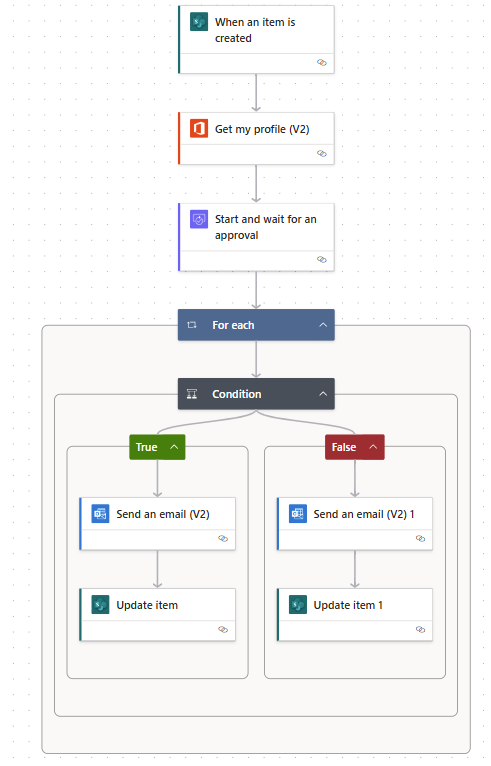
Flow Example Logic

Measurable Business Impact

โฑ Approval time reduced from 5 days to 24 hours

๐Ÿ“‰ Late payment penalties reduced by 90%

๐Ÿ“Š 100% audit trail compliance

๐Ÿงพ Manual tracking effort reduced by 70%

๐Ÿ’ฐ Improved vendor satisfaction

Strategic Outcome

The organization moved from email-based approvals to structured financial governance with real-time visibility and compliance tracking.
CASE STUDY 02

Executive Summary

A healthcare provider struggled with manual patient intake forms, appointment confirmations, and insurance verification tracking.

DataPond automated the intake-to-confirmation process using Power Automate, improving efficiency and patient experience.

The Business Challenge

  1. Paper-based intake forms
  2. Manual data entry into EMR
  3. Missed appointment confirmations
  4. Delayed insurance verification
  5. High front-desk workload

Leadership wanted operational efficiency and better patient flow.

DataPond Solution

We designed an end-to-end patient intake automation workflow.

How It Worked

  1. Patient submits intake form online (Microsoft Forms)
  2. Power Automate:
    1. Stores response in SharePoint
    2. Sends confirmation email & SMS
    3. Notifies front desk in Teams
  3. Insurance verification task auto-created
  4. Reminder email sent 24 hours before appointment
  5. No-show flagged automatically

Flow Example Logic

  1. If Insurance Type = Private โ†’ Route to Insurance Team A
  2. If Insurance Type = Government โ†’ Route to Team B
  3. If No Confirmation in 12 hrs โ†’ Send Reminder
  4. If No-Show โ†’ Update dashboard + notify admin

Measurable Business Impact

๐Ÿ“‰ Reduced no-shows by 22%

โฑ Reduced intake processing time by 60%

๐Ÿ“Š Eliminated duplicate data entry

๐Ÿ‘ฉโ€โš• Improved front-desk productivity

๐Ÿ“ˆ Faster insurance verification turnaround

Strategic Outcome

The healthcare provider shifted from manual intake operations to an automated patient management ecosystem, improving efficiency and patient experience

Call Now Button